Important - Please read before ordering
This clearance kit has been tested by JMC Secure and works with continuous 24/7 recording. However, it is not plug and play, requires a Windows PC for initial camera configuration, and does not support motion detection, smart events or mobile motion alerts.
Setup also needs some basic networking knowledge, as you'll give each camera a fixed IP address on your network and set its gateway. If terms like IP address and gateway are new to you, this kit may not be the right choice.
If you are comfortable following our setup guide, this kit offers excellent value for a ten-camera 8MP system.
About the CHLIP1032-8MP-W
This is a 10 camera 8MP IP CCTV kit with ten CMAX eyeball cameras, a HiLook 16 channel recorder and a 16 port PoE switch. The recorder records all ten cameras 24/7 in 8MP (4K), and it has six spare channels. The cameras have a white housing, and the same kit is also available with grey cameras (CHLIP1032-8MP-G).
Ten cameras suits bigger sites such as a farm, a commercial unit, a yard or a large property with outbuildings. The 2.8mm lens gives each camera a wide 97° view, which is ideal for covering open ground, building elevations and yard areas without gaps. Because the lens is fixed, it pays to mount cameras close to the points that matter most, such as loading doors, gates and vehicle entrances.
Infrared night vision reaches up to 30m, and the IP67 rated eyeball housings are fully sealed for outdoor use. Power and data reach each camera over one network cable from the 16 port PoE switch, which also has six free ports.
Footage records to the hard drives inside the recorder (drives sold separately). You can view it on a monitor over HDMI or VGA, or remotely with the HiLook app. The CMAX app service has closed, which is why these cameras come with a HiLook recorder.
This is clearance stock, and I won't be able to get any more CMAX cameras once it's sold. If you think you'll want more of the same cameras in future, it's worth adding extra cameras to your order now.
Camera Features
- 8MP (3840 × 2160) resolution across all ten cameras
- 2.8mm fixed lens - horizontal FOV 97°
- 30m infrared for night-time coverage
- WDR and 3D DNR for mixed lighting and low light
- IP67 rated for outdoor installation
- White housing (also available in grey)
- PoE powered from the included 16 port switch
Camera Spec
Manufacturers Spec Sheet (PDF)
NVR Features
- 16 channel HiLook recorder with six spare channels
- Records at up to 8MP on every channel
- H.265+ compression for longer storage
- Two hard drive bays (drives sold separately)
- HDMI and VGA outputs for a monitor
- HiLook app for remote live view and playback
NVR Spec
Manufacturers Spec Sheet (PDF)
How setup works
CMAX cameras aren't HiLook, so the recorder won't find them on its own, and plugging them straight into the recorder's PoE ports won't work. Setup takes three steps, and each camera only needs doing once.
1
Connect everything
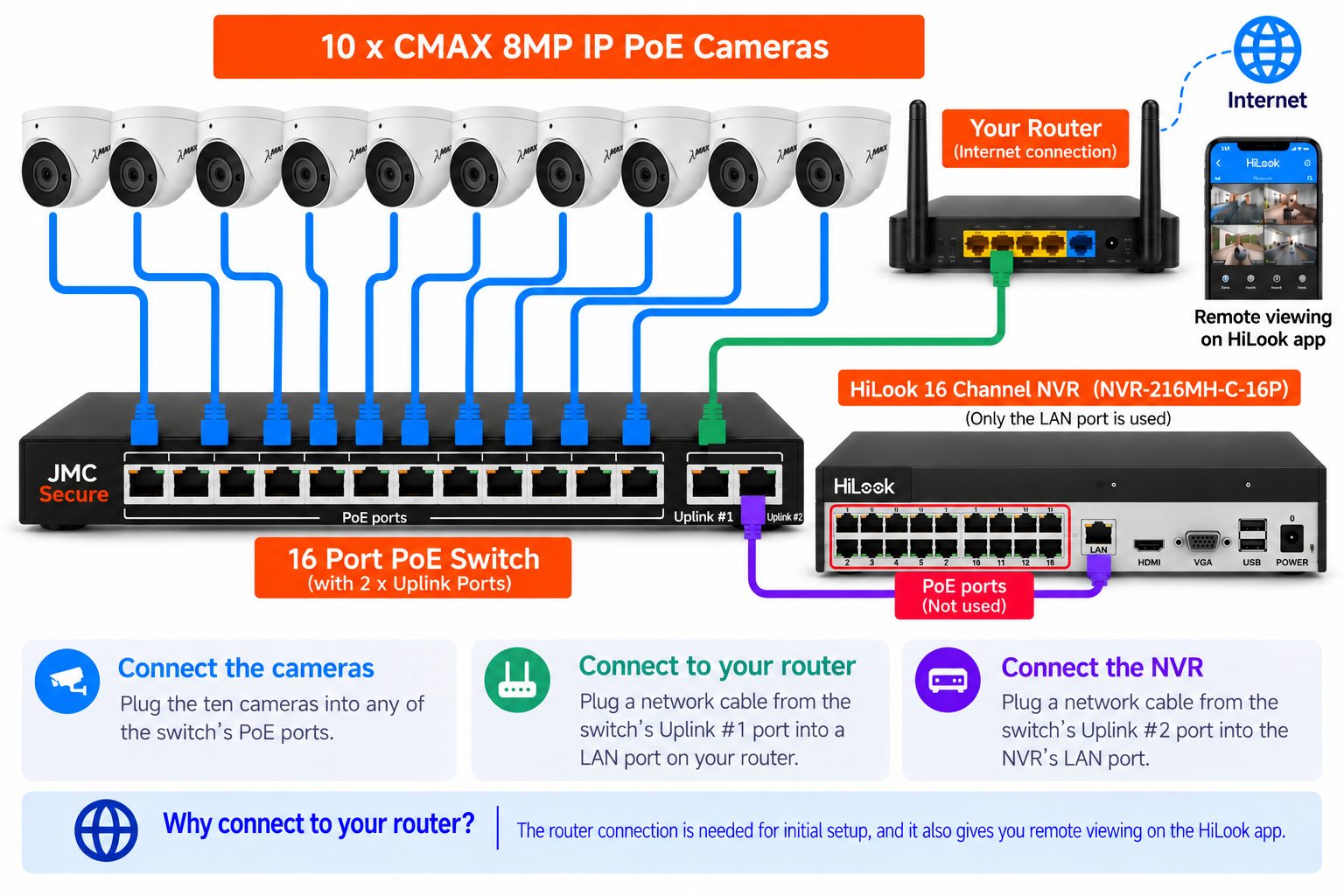
Diagram for illustration only. Your equipment may look slightly different.
2
Set each camera's IP address
CMAX cameras use the same free Device Manager as Kestrel. Install it on a Windows PC connected to the same network, then use it to give each camera an IP address that matches your router's network, with the gateway set to your router's address.
Download Device Manager (Windows, ZIP)
3
Add them to the recorder
On the recorder, edit a channel for each camera, enter the IP address you gave it and add it using ONVIF.
Want more detail? Follow my step-by-step setup guide (PDF).
What's included
- 1 × HiLook 16 channel NVR (NVR-216MH-C-16P)
- 10 × CMAX 8MP fixed eyeball cameras in white (IPC-CMAX-FW36)
- 1 × 16 port PoE switch with 2 uplink ports
For detailed specifications of each item in this kit, click the product thumbnails below to visit their pages.