Important - Please read before ordering
This clearance kit has been tested by JMC Secure and works with continuous 24/7 recording. However, it is not plug and play, requires a Windows PC for initial camera configuration, and does not support motion detection, smart events or mobile motion alerts.
Setup also needs some basic networking knowledge, as you'll give each camera a fixed IP address on your network and set its gateway. If terms like IP address and gateway are new to you, this kit may not be the right choice.
If you are comfortable following our setup guide, this kit offers excellent value for an eight-camera 8MP system.
About the CHLIP822-8MP-W
This is an 8 camera 8MP IP CCTV kit with eight CMAX eyeball cameras, a HiLook 8 channel recorder and an 8 port PoE switch. All eight cameras are recorded around the clock in 8MP (4K), so you can go back to any time of day and see exactly what happened. The cameras have a white housing, and the same kit is also available with grey cameras (CHLIP822-8MP-G).
Eight cameras is enough to cover all sides of a larger house, or the entrances, yard and parking of a small business. The 2.8mm lens gives each camera a wide 97° view, so you'll need fewer cameras to cover open areas like a car park or rear yard. As the lens is fixed, place the cameras where the things you care about most, like doors and gates, are reasonably close.
The eyeball housings are IP67 rated, fully sealed against dust and heavy rain, with infrared night vision up to 30m. Each one runs on a single network cable from the included PoE switch, which provides both power and data.
The HiLook recorder records to an internal hard drive (sold separately). You can view and play back footage on a TV or monitor over HDMI or VGA, or from your phone with the HiLook app. I've paired the cameras with HiLook recorders because the CMAX app service has now closed.
These are clearance cameras, and once they've sold there won't be any more. This kit fills all eight channels on the recorder. If you might add cameras in future, the 10 camera kit comes with a 16 channel recorder and leaves room to grow.
Camera Features
- 8MP (3840 × 2160) resolution for clearer evidence
- 2.8mm fixed lens - horizontal FOV 97°
- Up to 30m infrared night vision
- WDR and 3D DNR for difficult lighting and low light
- IP67 weatherproof eyeball housing
- White housing (also available in grey)
- Single cable power and data via PoE
Camera Spec
Manufacturers Spec Sheet (PDF)
NVR Features
- 8 channel HiLook recorder that records at up to 8MP
- H.265+ compression to save drive space
- HDMI and VGA outputs for local viewing
- HiLook app for remote live view and playback
- Hard drive sold separately
NVR Spec
Manufacturers Spec Sheet (PDF)
How setup works
CMAX cameras aren't HiLook, so the recorder won't find them on its own, and plugging them straight into the recorder's PoE ports won't work. Setup takes three steps, and each camera only needs doing once.
1
Connect everything
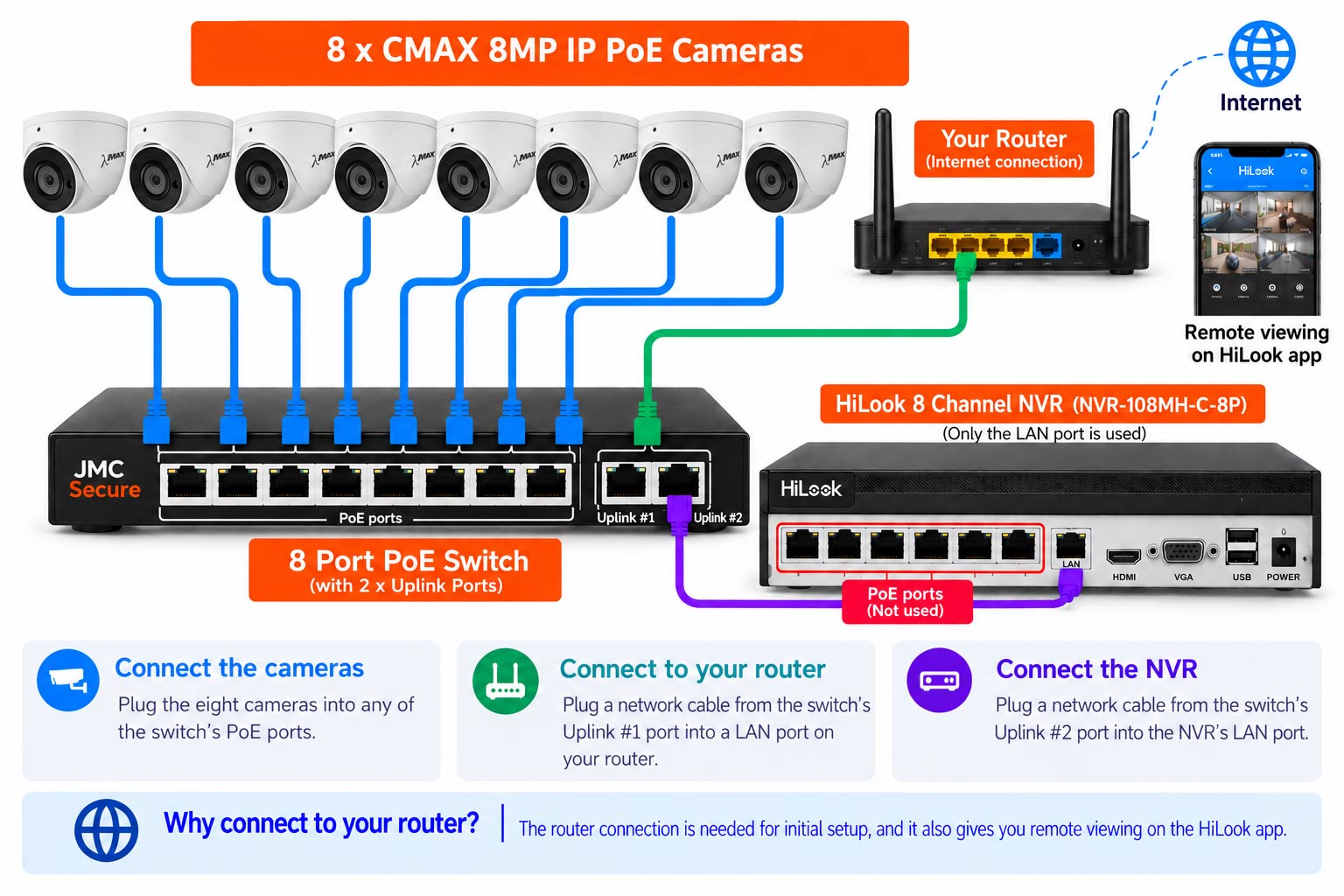
Diagram for illustration only. Your equipment may look slightly different.
2
Set each camera's IP address
CMAX cameras use the same free Device Manager as Kestrel. Install it on a Windows PC connected to the same network, then use it to give each camera an IP address that matches your router's network, with the gateway set to your router's address.
Download Device Manager (Windows, ZIP)
3
Add them to the recorder
On the recorder, edit a channel for each camera, enter the IP address you gave it and add it using ONVIF.
Want more detail? Follow my step-by-step setup guide (PDF).
What's included
- 1 × HiLook 8 channel NVR (NVR-108MH-C-8P)
- 8 × CMAX 8MP fixed eyeball cameras in white (IPC-CMAX-FW36)
- 1 × 8 port PoE switch with 2 uplink ports
For detailed specifications of each item in this kit, click the product thumbnails below to visit their pages.